
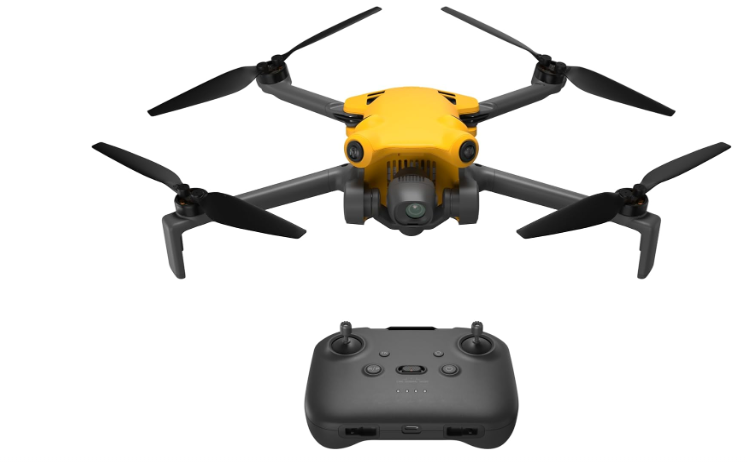
This article delves into some of the best camera drones under $500, covering their key specifications, camera capabilities, flight features and other details that can help you understand how they differ.
We also consider some of the things worth paying attention to when selecting a camera drone, from camera performance and flight time to durability and other practical considerations. The frequently asked questions then address some of the practical concerns you might have before choosing a drone.
The best camera drones under $500 featured here take different approaches to camera quality, flight capabilities, battery life and overall design. Looking at those differences can give you a clearer idea of what each drone offers and where certain features may matter more for the kind of flying you have in mind.
Best Camera Drones Under $500
1) DJI FlipRC-N3 Drone
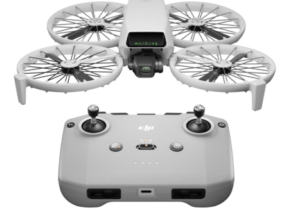
Full-coverage propeller guards give the DJI Flip RC-N3 an unusual starting point for a camera drone. Instead of leaving its propellers exposed, DJI surrounds them with lightweight protection while keeping the aircraft under 249g. It also folds down compactly for travel. That makes the Flip particularly interesting if you want a beginner-friendly camera drone that feels a little less intimidating to fly.
The protection is only part of the appeal, though. A 1/1.3-inch CMOS sensor, 48MP still photography, 4K/60fps HDR video and a three-axis gimbal put the Flip well beyond the basic camera quality you might expect from a lightweight beginner drone. The 2.7K vertical shooting option is useful for social content. Meanwhile, 10-bit color gives you more flexibility when editing footage later.
Then there’s subject tracking. The Flip can follow a moving subject while you concentrate on flying. That opens up shots that would otherwise require more manual control. Palm takeoff adds another layer of convenience, letting you get the drone into the air without turning launch into a whole procedure. GPS positioning and Return to Home provide useful assistance when flying outdoors, too.
And here’s where the Flip gets particularly practical. Its foldable body and built-in propeller guards make it easy to carry. They also speed up setup when you’re traveling, hiking, or simply heading outside for a few shots. The RC-N3 controller folds down as well and works with a smartphone for live viewing and control. DJI rates the battery for up to 31 minutes, although actual flight time will vary with conditions, flight speed and motor usage.
For travel videos, vlogging and everyday aerial photography, the Flip offers more imaging flexibility than its compact size might suggest. The 4K/60fps HDR recording is useful for capturing smoother motion. The three-axis gimbal also helps keep footage steady as the aircraft moves. That gives the Flip a broader range of uses than a basic entry-level camera drone.
But there’s a catch. Those propeller guards are not obstacle avoidance. They can help protect the propellers during minor contact. However, they do not mean the drone can detect and avoid objects in its flight path. The Flip is also not waterproof. Its lightweight body can be more affected by strong wind than a larger aircraft. Those are worth considering if your flying plans extend beyond calm, open outdoor spaces.
The RC-N3 setup also keeps your phone in the loop. That’s convenient if you already prefer using your smartphone for live viewing. However, it won’t appeal as much if you want a dedicated-screen controller. Android users should also check DJI’s current app installation options before buying. DJI Fly availability can differ from the usual Google Play experience.
Features
- 1/1.3-inch CMOS camera
- 48MP stills
- 4K/60fps HDR video
- Three-axis mechanical gimbal
- 2.7K vertical video
- Subject tracking and Spotlight
- Under-249g foldable design
- Full-coverage propeller guards
Pros
- Strong image quality
- Built-in propeller protection
- Compact and portable
- Beginner-friendly controls
Cons
- No obstacle avoidance
- Single battery in RC-N3 package
2) Potensic Atom 2 Fly More Combo with RC PTD 1
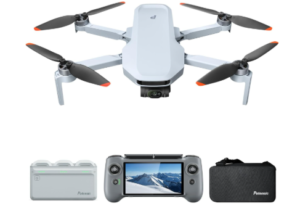
Three batteries, a dedicated touchscreen controller, a charging hub and a carrying bag make the Potensic ATOM 2 Fly More Combo feel like a complete flying setup rather than a drone you still need to kit out. As another contender for the camera drones under $500, that gives you more of the equipment needed to fly and keep shooting without immediately buying extra accessories.
Its built-in 5.5-inch 1080p touchscreen means you don’t need to rely on your phone for the main flying experience. The 700-nit display is designed for outdoor viewing, while the controller can run for up to three hours and supports 27W fast charging. For longer outings, the dedicated screen also makes the setup feel considerably more self-contained.
Then there’s the camera, which gives the ATOM 2 plenty to talk about. Its 1/2-inch Sony CMOS sensor captures 48MP stills and supports 8K photography, while video reaches 4K/30fps HDR. The three-axis gimbal helps keep footage steady, and the F1.8 aperture gives the camera more light to work with as conditions become less favorable. Add P-Log and 2.7K vertical shooting, and this isn’t simply a drone built around basic aerial footage.
The clever part is how much of that capability is automated. AI Track offers Follow, Spotlight and Parallel modes, letting you create moving shots without manually controlling every change in position. AI Night Shot, QuickShots, Panorama, Dolly Zoom, CineRoll and Slow Motion add even more ways to experiment. Cruise Control is useful for longer movements, too, since you can maintain a steady flight path without constantly holding the stick in the same position.
Each of its three batteries is rated for up to 32 minutes, giving the package a claimed 96 minutes of total flight time. That’s three flights, not a 96-minute single flight, but it still matters when you’re filming, exploring or practicing throughout the day. The charging hub can charge all three batteries together, while the folding body and shoulder bag keep the setup reasonably travel-friendly.
The ATOM 2 also covers the basics that make a camera drone easier to fly. GNSS positioning, automatic takeoff and landing, a customizable home point and Smart Return to Home reduce some of the work involved in outdoor flying. PixSync 4.0 supports transmission distances of up to 10km under the manufacturer’s stated conditions, with a 1080p/30fps live feed.
The PTD 1 is designed specifically for the ATOM 2 rather than serving as a universal controller across Potensic’s lineup. If you’re shopping with a firm $500 ceiling, check the current price of this Fly More Combo before buying. The package includes the controller, three batteries and other accessories, so its value depends partly on how much of that equipment you actually need.
It is important to note that this drone’s systems don’t provide obstacle avoidance, so you’ll still need to monitor the drone’s flight path.
Features
- PTD 1 controller with 5.5-inch touchscreen
- Three 32-minute flight batteries
- 1/2-inch Sony CMOS sensor
- AI Track with Follow, Spotlight and Parallel
- 4K/30fps HDR video
- Three-axis mechanical gimbal
- 48MP stills and 8K photos
- 10km transmission range
Pros
- Dedicated touchscreen controller
- Extended flight time
- Versatile shooting modes
- Extensive automated flight features
Cons
- No obstacle avoidance
3) DJI Mini 4K Drone with 4K UHD Camera
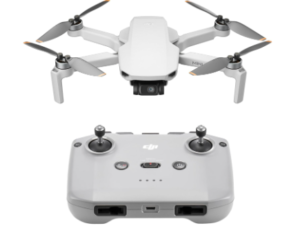
The DJI Mini 4K Drone with 4K UHD Camera takes a straightforward approach to aerial photography, pairing a compact sub-249g design with 4K video, a three-axis gimbal and beginner-friendly flight controls. For anyone entering the world of camera drones for the first time, that simplicity can be a feature in itself.
Flying it is similarly uncomplicated. One-tap takeoff and landing, GPS Return to Home and stable hovering take some of the guesswork out of basic outdoor flights. DJI also rates the Mini 4K for Level 5 wind resistance, with a stated maximum wind speed of 38kph. That gives it more confidence outdoors than its small size might suggest, although a lightweight drone can still be pushed around in genuinely strong or gusty conditions.
Its camera covers the essentials without making the drone feel basic. The 4K/30fps video recording provides detailed footage, while the three-axis mechanical gimbal keeps the camera steady as the aircraft moves. The 2.7K vertical shooting option is useful for social media content, and support for DNG photos gives photographers more flexibility when editing their images rather than locking them into finished-looking files straight from the drone.
Then there are the QuickShots. Helix, Dronie, Rocket, Circle and Boomerang automate specific flight movements, giving beginners an easy way to create more dynamic footage without having to master every control first. That’s a different kind of convenience from the AI tracking found on the ATOM 2: instead of following a subject through a shot, the Mini 4K handles a predefined movement for you.
Portability is another natural fit for the Mini 4K. Its foldable body and sub-249g weight make it easy to pack for trips, while the RC-N1C controller pairs with a smartphone for viewing and control. Battery life follows the familiar pattern for this class, with each Intelligent Flight Battery rated for up to 31 minutes. Multi-battery packages can extend the total flying time across separate flights, although wind, speed and other conditions can reduce actual flight time.
There’s no obstacle avoidance or subject tracking, and its low-light performance is less compelling than what you’ll get from some of the more camera-focused drones in this roundup. Its feature set is also less ambitious than the ATOM 2 or some budget alternatives offering Follow-Me, Waypoint and other automated modes.
If you’re comparing the best Camera Drones Under $500 and mainly want a straightforward entry point into DJI’s ecosystem rather than a drone loaded with advanced automation, the Mini 4K keeps the proposition refreshingly clear.
Features
- 4K/30fps Ultra HD video
- Under-249g foldable design
- Three-axis mechanical gimbal
- QuickShots automated modes
- GPS Return to Home
- 2.7K vertical shooting
- Level 5 wind resistance
- RC-N1C smartphone controller
Pros
- Beginner-friendly
- Compact and travel-friendly
- Stabilized 4K video
- Useful automated modes
Cons
- No obstacle avoidance or tracking
- Less capable in low light
4) Ruko Drone with Camera for Adults 4K Video & 8K Photo
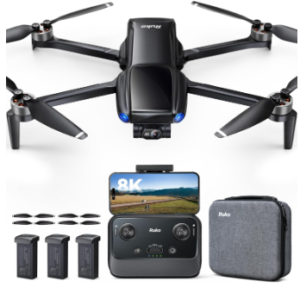
The Ruko Drone with Camera for Adults 4K Video & 8K Photo packs an unusually broad set of features into a relatively modest package. Along with the drone and controller, you get three batteries, a charging hub and a carrying case. The aircraft adds 8K still photography, 4K video, GPS positioning and several automated flight modes, giving you plenty of functionality without moving into a more expensive class of drone.
Its camera also looks impressive on paper. A 1/2-inch 48MP sensor captures 8K photos and 4K/30fps video, while a three-axis brushless gimbal and electronic image stabilization help keep footage steady in flight. The high-resolution still mode gives you plenty of detail in daylight, although 8K does not automatically mean better images in every situation. Lighting, stabilization and optics still matter, and the digital zoom is less convincing than the headline resolution suggests.
The flight modes are where this drone feels more ambitious than a basic beginner model. Cruise, Follow-Me, Waypoint and Point of Interest provide several ways to automate movement, while Beginner, Normal and Sport modes let you adjust the drone’s response as your confidence grows. GPS, optical flow, a barometer and TOF positioning also help it maintain its position. However, these systems are not obstacle avoidance, so you’ll still need to watch the flight path around trees, buildings and other objects.
For longer outings, the three-battery setup is genuinely useful. Each battery is rated for up to 32 minutes, giving you a claimed 96 minutes of flight time across separate flights. The parallel charging hub also lets you prepare the batteries together instead of charging them one at a time. That’s more practical than simply seeing a high maximum-flight figure in the specifications.
Travel is another area where the package makes sense. The aircraft folds into a compact form, weighs under 249g and comes with a carrying case, making the setup easier to take between locations. The controller works with both iOS and Android phones, while GPS Return to Home adds convenience when flying outdoors.
Not every feature is equally convincing, though. Follow-Me may not always perform as reliably as the feature list suggests, and the drone can be quite loud during flight. The phone holder may also feel restrictive with larger devices, so these details are worth weighing against the stronger specifications.
Features
- Follow-Me, Waypoint, Cruise and Point of Interest
- Three 32-minute batteries
- 1/2-inch 48MP CMOS camera
- Three-axis gimbal with EIS
- GPS, TOF, optical flow and barometer positioning
- 8K photos and 4K/30fps video
- Under-249g foldable design
- Carrying case and charging hub
Pros
- Multiple automated flight modes
- Three-battery setup
- High-resolution still photography
- Feature-rich for the price
Cons
- Inconsistent Follow-Me performance
- No obstacle avoidance
5) Bwine F7MINI 4K Video 8K Photo Drone
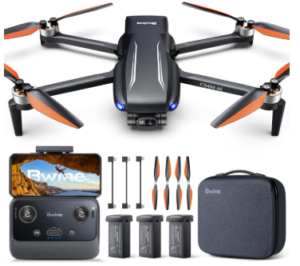
Another option among the best camera drones Under $500, the Bwine F7MINI 4K Video 8K Photo Drone packs a broad set of camera and flight features into a compact design. Its foldable, under-249g body keeps it easy to carry, while the shooting and flight options give you more control than you’d expect from a small budget drone.
That compactness matters when the drone is part of a day out rather than the main event. The F7MINI folds down for easier storage, weighs under 249g and comes with a carrying case, so it can move from one location to another without taking up much space. Beginner Mode also gives newer pilots a simpler way to get started, while the Bwine GPS app handles the drone’s flight and camera functions on both iOS and Android.
Where the F7MINI gets more interesting is in how it lets you plan a shot. Follow-Me, Orbit, Waypoint and Cruise modes automate different types of movement, so you are not limited to manually controlling every part of a flight. Waypoint can create a repeatable route, Orbit keeps a subject centered during circular movement, and Follow-Me is designed to track a moving subject. The adjustable camera angle adds another layer of control when setting up the shot.
The camera itself has plenty of range to work with. A 1/2-inch Sony CMOS sensor captures 48MP stills and 8K photos, while video reaches 4K/30fps. A three-axis brushless gimbal with EIS helps stabilize footage, and the F1.8 aperture can help the sensor gather more light. Vertical shooting is useful for social content, while 5x digital zoom offers another way to frame a subject, although it cannot provide the same flexibility as optical zoom.
You also get some breathing room between flights. The three-battery setup provides up to 32 minutes per battery, for a claimed 96 minutes across separate flights. Parallel charging helps prepare the batteries together, which is useful when you plan to shoot for longer rather than making a quick single flight.
The automated modes do not remove the need to pay attention, however. The F7MINI has no obstacle avoidance, and its manual recommends flying in open areas free of obstacles. Follow-Me and Waypoint also depend on a strong GPS signal, meaning buildings, trees and other obstructions can interfere with those functions.
For a small drone, the F7MINI gives you several ways to approach aerial content, from vertical social clips and planned Waypoint routes to automated subject movements.
Features
- 1/2-inch Sony CMOS sensor
- Follow-Me, Orbit, Waypoint and Cruise
- Three 32-minute batteries
- 48MP 8K photos and 4K/30fps video
- Three-axis brushless gimbal with EIS
- F1.8 aperture and 5x digital zoom
- Under-249g foldable design
- Vertical shooting
Pros
- Flexible shooting options
- Three-battery setup
- Multiple automated flight modes
- Compact design with carrying case
Cons
- No obstacle avoidance
6) Potensic ATOM SE GPS Drone with 4K EIS Camera
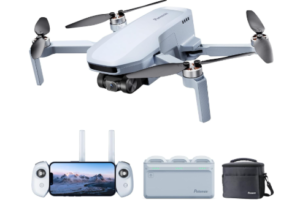
Lastly, we have the Potensic ATOM SE GPS Drone with 4K EIS Camera, a practical option for buyers who want to spend more time flying without stepping up to a heavier or more expensive drone. Its sub-249g foldable design, Level 5 wind resistance and three-battery setup give it a strong outdoor focus, while GPS positioning and several flight modes keep the flying experience accessible to beginners.
Outdoor flying is where the ATOM SE’s design makes the most sense. Brushless motors and a stated Level 5 wind-resistance rating give the lightweight drone useful capability in breezier conditions, while Beginner, Video, Normal and Sport modes let you choose how responsive the aircraft feels. Sport mode can reach speeds of up to 16m/s, although even a lightweight drone can still be affected by strong or gusty conditions.
That extra flying capability becomes more useful when you have enough battery capacity to take advantage of it. The package includes three batteries, each rated for up to 31 minutes, giving you a claimed 93 minutes across separate flights. A 60W parallel charging hub can charge all three together in about 1.5 hours, reducing the time spent preparing for your next outing. The 93-minute figure, of course, represents multiple flights rather than continuous airtime.
When you want the drone to handle some of the movement, Follow-Me, Waypoint, Circle Flight and Cruise Control provide several automated options. These modes can help create different shots and routes without requiring you to control every movement manually. GPS Return to Home adds another useful function when flying outdoors, although there is no obstacle avoidance, so automated flight still calls for a clear environment and an attentive pilot.
The camera takes a simpler approach than the imaging system on the newer ATOM 2. A 1/3-inch Sony CMOS sensor captures 12MP photos and 4K/30fps video, while Potensic’s ShakeVanish electronic stabilization helps reduce unwanted movement in footage. The camera also adjusts from +20 to -90 degrees, giving you more flexibility when shooting from different heights. It can produce useful daylight aerial footage, but buyers looking for more advanced photography features will find the camera less capable than some alternatives in this roundup.
Features
- 4K/30fps video with ShakeVanish EIS
- 12MP Sony CMOS camera
- Three 31-minute batteries
- 60W parallel charging hub
- GPS Return to Home
- Follow-Me, Waypoint, Circle Flight and Cruise Control
- Under-249g foldable design
- Three-axis camera adjustment
Pros
- Long combined flight time
- Beginner-friendly flight modes
- Lightweight and portable
- Good outdoor flight capability
Cons
- Less advanced camera
Choosing the Best Camera Drones Under $500
With so many camera drones under $500 offering 4K video, GPS, automated flight modes and compact designs, the right choice comes down to what you actually want to do with the drone. A model suited to casual travel videos does not need the same camera or flight capabilities as one intended for action shots or more deliberate aerial photography.
With that in mind, it helps to look beyond the headline specifications and focus on the features that will actually shape your flying experience.
How Much Camera Do You Really Need?
Start with the kind of footage and photos you want to create. 4K video is now common in this price range, but resolution is only one part of the picture. Sensor size, image stabilization, HDR support and low-light performance can all affect the quality of aerial footage.
Still photography deserves a look, too. Some camera drones under $500 push into 48MP or even 8K photography, while others keep things simpler with lower-resolution stills. Higher numbers can give you more detail and cropping flexibility, but they do not automatically produce better images. The sensor, optics, lighting and stabilization still have a say in the final result.
If you’re mainly recording travel clips or social content in daylight, you may not need the most advanced camera in the group. However, photographers and creators who plan to edit footage or shoot in changing light have more reason to pay attention to sensor size, color profiles, gimbal stabilization and other imaging features.
Think About the Shots You Want to Create
How you plan to use a camera drone should influence which flight features you prioritize. QuickShots, Follow-Me, subject tracking, Waypoint, Orbit and Cruise Control can all automate parts of a flight, but they do not accomplish the same thing.
Want the drone to follow you while you move? Look for subject tracking or Follow-Me. Prefer a predefined cinematic movement that you can trigger with a tap? QuickShots may be more useful. If you want to plan a route or repeat a particular flight path, Waypoint offers a different kind of control.
More automated modes are not automatically better, either. The right features are the ones that match the shots you actually intend to make.
How Long Do You Actually Want to Stay in the Air?
Don’t judge flight time by the biggest number printed on the box. A battery rated for around 31 or 32 minutes gives you that maximum on a single flight under stated conditions, not an uninterrupted afternoon in the air.
Multiple batteries can make a much bigger difference. A three-battery package can turn a short flying session into several flights before you need to recharge, which is particularly useful when you’re traveling, practicing or filming several locations. Charging hubs can also save time by letting you prepare multiple batteries together.
Actual flight time will vary with wind, speed, flight style and other conditions. So if you expect to spend long periods shooting, consider the entire battery setup rather than comparing maximum flight times alone.
Phone Screen or Dedicated Controller?
The controller is easy to overlook until you’re actually holding it. Some camera drones rely on a smartphone for live viewing, while others come with a dedicated screen built into the controller.
A phone-based setup can be convenient if you already use your smartphone for most of your everyday tasks. It also means one less dedicated display to carry. A built-in screen, on the other hand, gives you a more self-contained flying setup and avoids tying the main viewing experience to your phone.
Think about which setup feels more practical for the way you travel and fly. If you regularly head out specifically to film, a dedicated controller may be worth prioritizing. For occasional flights, a smartphone-based controller may be perfectly adequate.
A Lightweight Drone Still Has Limits Outdoors
Portability is one of the biggest attractions of this category, but a compact drone still has to contend with the conditions around it. GPS positioning and Return to Home can make outdoor flying easier, while wind resistance can matter when you’re flying in more exposed areas.
Obstacle avoidance deserves particular attention. GPS, optical flow, TOF sensors and stable hovering can help with positioning, but they should not be confused with systems that detect and avoid obstacles in the drone’s path.
If you’re flying around trees, buildings or other obstructions, automated flight modes still require an attentive pilot. A lightweight camera drone may also be more susceptible to strong or gusty wind than a larger aircraft, even when it carries a respectable wind-resistance rating.
What Are You Willing to Carry?
A drone’s folded dimensions tell only part of the portability story. Think about the entire kit you will take with you: the aircraft, controller, batteries, charging equipment and carrying case.
A compact single-battery setup can be easier for quick trips, while a Fly More-style package may make more sense when you’re heading out for a full day of shooting. The extra batteries and accessories add weight, but they can also save you from having to buy those items separately later.
For travelers and hikers, the best setup may be the one you will actually want to carry. A few extra accessories are useful only if they fit the way you plan to use the drone.
More Features Don’t Always Mean More Value
It’s easy to get distracted by impressive numbers and long feature lists. An 8K photo mode, 48MP sensor, 10km transmission range or a collection of automated flight modes can sound compelling, but each feature needs to earn its place in your buying decision.
Ask what problem the feature solves for you. If you mostly want simple 4K travel footage, you may gain more from reliable stabilization, portability and extra batteries than from a long list of advanced shooting modes. If you’re creating more deliberate aerial content, however, features such as subject tracking, Waypoint, better camera hardware or a dedicated controller may carry more practical value.
The best camera drones under $500 are the ones whose camera, flight features, battery setup and controls match the way you actually plan to use it. A shorter specification sheet can be perfectly adequate if it gives you the features that matter most.
Best Camera Drones Under $500 FAQs
How Long Can a Camera Drone Under $500 Fly?
Most camera drones in this price range offer around 30 minutes of maximum flight time per battery. That figure comes from the manufacturer’s stated conditions. Wind, flight speed, temperature and aggressive flying can reduce actual airtime.
If you plan longer filming sessions, a package with multiple batteries can be more useful. You may get more practical flying time than you would from a drone with a longer single-battery rating.
Do Camera Drones Under $500 Have Obstacle Avoidance?
Some of the best camera drones under $500 offer flight-assistance systems such as GPS, optical flow or TOF positioning. These systems should not automatically be treated as obstacle avoidance. Obstacle avoidance requires the drone to detect objects in its flight path and respond accordingly. If a drone does not specifically provide that capability, you’ll still need to monitor its surroundings. This becomes especially important when using automated flight modes.
How Do You Maintain a Camera Drone?
Basic maintenance starts with keeping the drone, camera and gimbal free from dust and debris. Check the propellers regularly for cracks, bends or other damage. Replace them when necessary. Batteries also need proper care, including safe charging and storage. Avoid exposing them to extreme temperatures. After flying, especially outdoors, inspect the aircraft before packing it away. Follow the manufacturer’s guidance for firmware updates, cleaning and storage.
Read Also:
Final Thoughts
The best camera drones under $500 cover a surprisingly wide range of flying styles. Some put more emphasis on camera capability, while others give you longer shooting sessions, more automated flight options or a simpler way to get started. Those differences matter far more when you match them to the kind of flying you actually plan to do.